
Connecting Codex to Azure compute
A practical, cost-controlled setup for computational chemists and drug discovery scientists

Most computational scientists already know which calculations are heavy. What we do not necessarily know is how to choose cloud services, configure permissions, or make sure a forgotten machine does not keep running. As a medicinal and computational chemist, not only do I not have to worry about these details, but I want to be acutely conscious about cost. It took me a few hours to create and run this set up.
In this particular case, based off a simple initial prompt (see below), Codex checked the Mac, asked me to sign in, created only the minimum Azure workspace, obtained permission for one type of GPU, and completed a real ColabFold test. Before spending money, it showed the current price and the most the job could cost.
The key useful outcome was for Codex to recognize when a scientific step needs a GPU, tell me the price, and wait for permission before starting.
Why this matters
Many drug discovery workflows mix ordinary local analysis with a few expensive steps. Literature review, filtering, plotting, and short simulations may run perfectly well on a laptop or CPU. Structure prediction with ColabFold or AlphaFold, RFdiffusion, Boltz-2, and some larger simulations may need a GPU.
The practical question is simple: can the software use a GPU only for those steps, save the results, shut down, and tell me the maximum cost first? Idle cycles can add up to significant costs.
Azure Machine Learning “serverless” jobs fit that pattern. Here, serverless means that Azure provides a temporary machine for one calculation and removes it when the job finishes. I do not have to build or maintain a cluster. The GPU is still billed while Azure is using it, so price checks and time limits still matter. Microsoft describes this job model here.
The initial prompt
The complete initial prompt is intentionally detailed. That detail is the safety specification: it says what Codex may create, when it must stop, what cost information it must show, and which scientific steps should stay on CPU. The prompt is preserved exactly below, so some Azure terminology remains in this section.
Set up a minimal, cost-controlled system that lets me run selected scientific GPU workloads from this local Codex project on Azure Machine Learning serverless GPU compute.

I am a chemist, not a cloud engineer. Perform the setup yourself rather than merely giving me instructions. Work incrementally, validate every stage, and explain only decisions that require my input.

My intended workloads include:

- RFdiffusion
- ProteinMPNN
- AlphaFold or ColabFold
- OpenMM or GROMACS molecular dynamics
- occasional long checkpointed MD simulations

Use Azure Machine Learning serverless command jobs. Do not create raw Azure virtual machines, compute instances, persistent compute clusters, Kubernetes resources, online endpoints, batch endpoints, or continuously running services.

Mandatory approval rules that should never be violated, no exceptions:

1. You may inspect local files, install local software, create scripts, test code locally, and perform non-billable Azure queries.
2. Pause whenever I must authenticate, complete multifactor authentication, create an account or subscription, choose a subscription, enter payment information, or request GPU quota.
3. Before running any Azure command that creates, modifies, deletes, deploys, or submits a potentially billable resource, show me:

- the exact command;
- what resource it affects;
- whether it can generate charges;
- the maximum plausible immediate charge;
- how it will be stopped or deleted.
4. Do not execute that command until I explicitly approve it.
5. Never submit a GPU job without a live cost preflight.
6. Every GPU job must use exactly one approved GPU instance, contain a hard timeout, use finite serverless compute, and save outputs before terminating.
7. Never expand GPU count, timeout, storage size, or approved GPU families without explicit permission.
8. Do not enable automatic approval or automatic review for cloud actions.
9. Do not store secrets, passwords, Azure tokens, or payment information in project files.
10. Treat Azure budget alerts as warnings rather than hard spending limits.

Build a simple command interface with these actions:

- gpu setup
- gpu price
- gpu estimate <job>
- gpu benchmark <job>
- gpu run <job>
- gpu status
- gpu stop <job>
- gpu download <job>
- gpu audit
- gpu teardown

For gpu estimate, display:

- Azure region;
- exact GPU SKU;
- Standard or Spot tier;
- current hourly price and source;
- expected runtime;
- expected GPU-compute cost;
- timeout;
- worst-case compute cost at timeout;
- estimated storage or transfer charges, when material;
- total authorization ceiling.

Fail rather than guess when the price is ambiguous or unavailable.

For gpu run, require me to type an explicit authorization phrase containing the job name, maximum authorized dollar amount, and a hash of the priced job definition.

In a typical complex, multistep workflow that uses a mix of CPU and GPU-enabled tasks, use Azure and GPU only for tasks for which GPU's are mandatory (like colabfold or boltz2). Any job that can pick between CPU and GPU (eg. short MD simulations) should always use CPU. Any time you are going to a launch a GPU task or think a task would benefit from GPU, you need to tell me, ask for explicit permissions and provide cost estimates. Never submit a Azure job without my explicit approval.

For molecular dynamics, never extrapolate a long run from generic benchmarks. First run a short benchmark on my actual prepared system, measure ns/day, and calculate the expected cost of each checkpointed production segment.

For RFdiffusion and AlphaFold workflows, price every stage separately, including backbone generation, sequence design, structure prediction, filtering, and ranking. Do not submit all stages at once unless I explicitly approve the complete workflow ceiling.

Begin by checking this Mac for required tools. Then guide me through Azure authentication and subscription selection. Do not create a billable Azure resource during the first phase.
What the setup produced
The finished setup allowed exactly one T4 GPU at a time. The first test used Standard pricing, which means Azure should not interrupt the machine to reclaim capacity. Every job had a firm stopping time, saved its results before ending, checked the latest price, and asked for approval.
Nothing stayed running between jobs. The setup did not create a permanent virtual machine, compute cluster, web service, or other always-on resource.
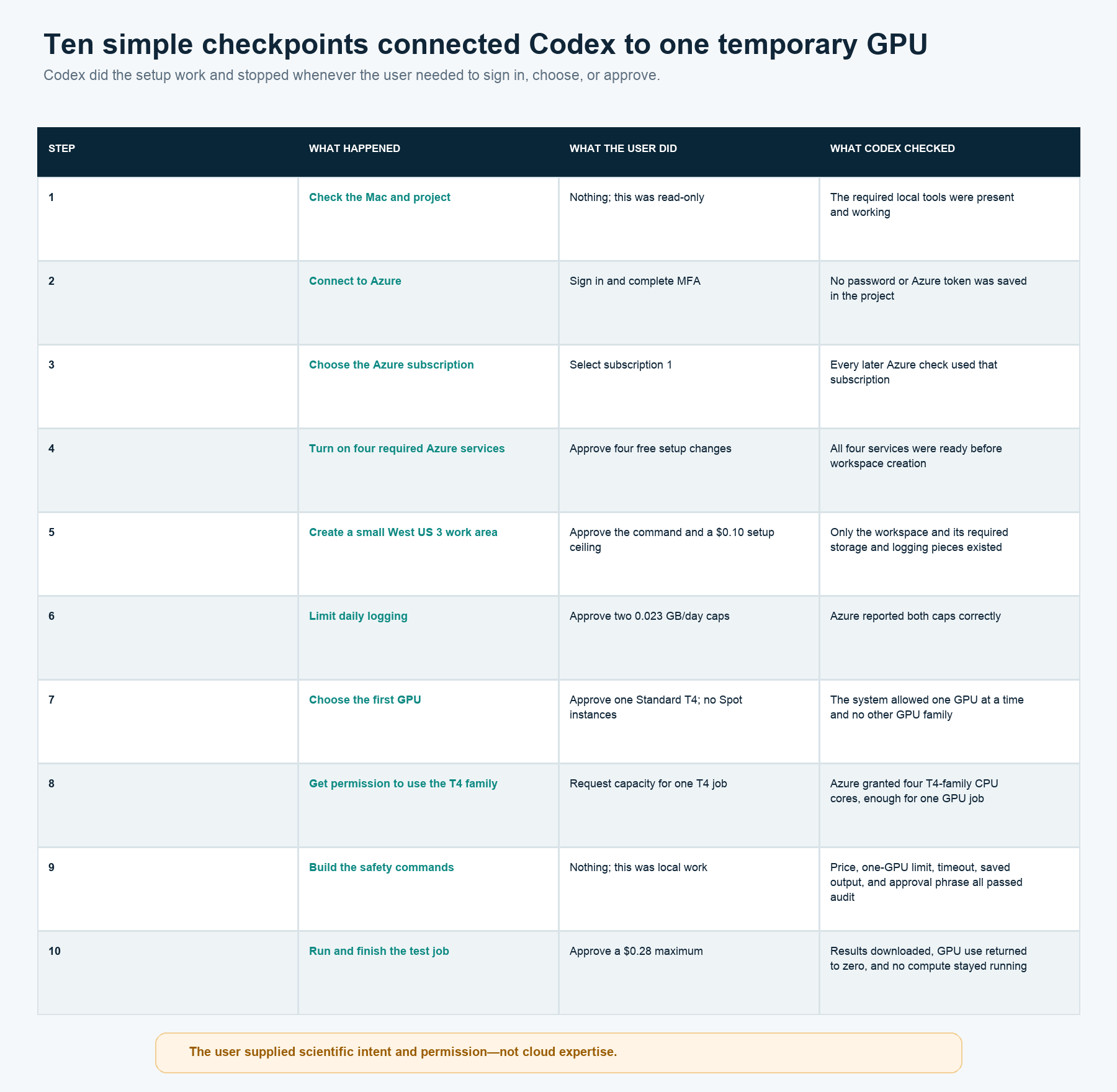
In plain language, the ten steps were:
Check that the Mac had the required local tools.
Ask the user to sign in to Azure and complete MFA.
Ask which Azure subscription to use.
Turn on four Azure services needed by the workspace.
Create one small work area in West US 3.
Limit how much diagnostic logging Azure could collect each day.
Allow one Standard T4 GPU and keep interruptible Spot machines disabled.
Ask Azure for permission to use enough T4 capacity for one job.
Build and test the local
gpusafety commands.Price, approve, run, download, and finish the first test.
The one confusing part: GPU quota
Azure uses the word quota for permission to use a certain amount of a resource. A new account may have permission to create an Azure workspace but no permission to use a particular GPU family. GPU permission is also tied to a region. In this case, West US 3 initially allowed zero T4 GPUs. Microsoft explains these GPU quota rules here.
The Azure portal first showed the wrong region and a disabled request button. Later, Azure would not display the request status even though the user owned the subscription. The fix was to add one narrow, free permission called Support Request Contributor, which allows an account to create and read Azure support requests.
After that permission was approved, Codex found the quota request that already existed instead of creating another one. Azure granted enough capacity for one T4 job. This was the least intuitive part of the setup, but Codex handled the diagnosis with free, read-only checks.
How each GPU job stays under control
The local gpu command follows the same five steps every time:
Notice the heavy step. Decide whether the calculation truly needs a GPU, would merely benefit from one, or should stay on CPU.
Show the price. Look up the exact machine price, estimate the likely run time, set a firm stop time, and calculate a maximum cost.
Ask permission. Show the Azure command and require an approval phrase that names the job and dollar maximum.
Run one job. Check the price again, start one approved GPU, and watch the calculation.
Bring everything back. Save and download the results, confirm the job ended, and check that no compute remains running.
The price comes directly from Azure’s public retail-price service. Codex looks for the exact region and machine type. If the answer is missing or ambiguous, the command stops rather than guessing. Microsoft documents the price service here.
What happened in the first real test
The first job ran ColabFold 1.6.1 on a 175-residue filgrastim variant. It used one T4 GPU, Standard pricing, a fixed software image, and a 30-minute maximum. It saved the predicted structure, confidence scores, logs, exact input, and GPU information before shutting down.
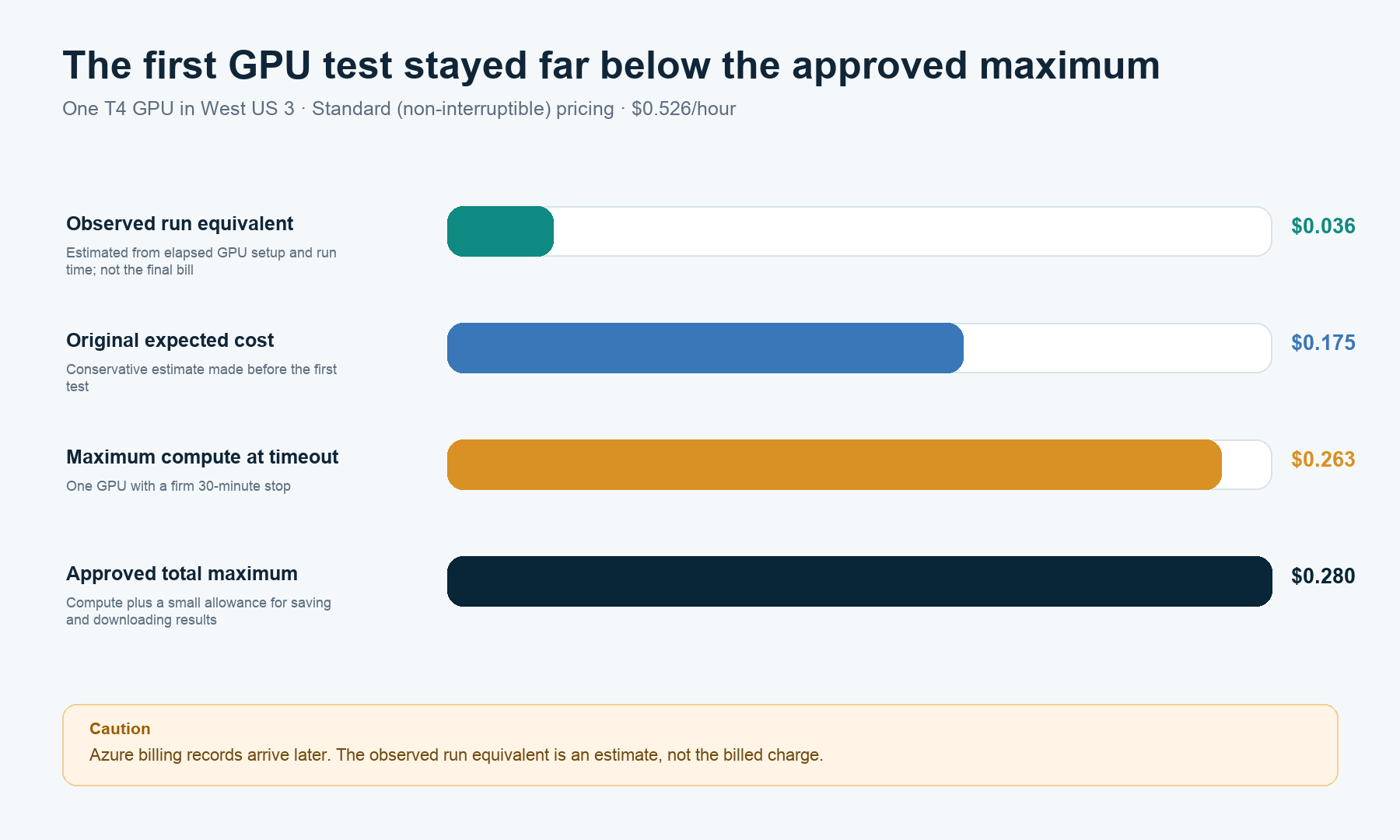
The live rate was $0.526/hour. Before running, Codex estimated $0.1753 of compute. Even if the job reached its 30-minute stop, compute could cost no more than $0.2630. Adding a small allowance for saving and downloading results produced a simple approval ceiling of $0.28.
The calculation itself took 70 seconds. Including the time Azure needed to prepare the temporary machine, the full observed run was about 4 minutes 8 seconds. The results downloaded successfully, Azure released the GPU capacity, and no machine or cluster remained running.
The cloud test worked. The protein model was not scientifically useful. Mean pLDDT was 46.24 and pTM was 0.35, both low for making a structure-based decision. This test used only the query sequence, without evolutionary information from a multiple-sequence alignment. It proved that the workflow ran; it of course did not validate the proposed filgrastim mutations.
How Codex uses this inside a larger workflow
Codex can automatically notice that a step needs or may benefit from a GPU. It can prepare the input and estimate the cost. It cannot automatically launch Azure; it always stops for approval first. The best strategy is to split calculations between CPU and GPU, using GPU only when needed, prompting when advantageous, and always asking for permission before submitting any job.
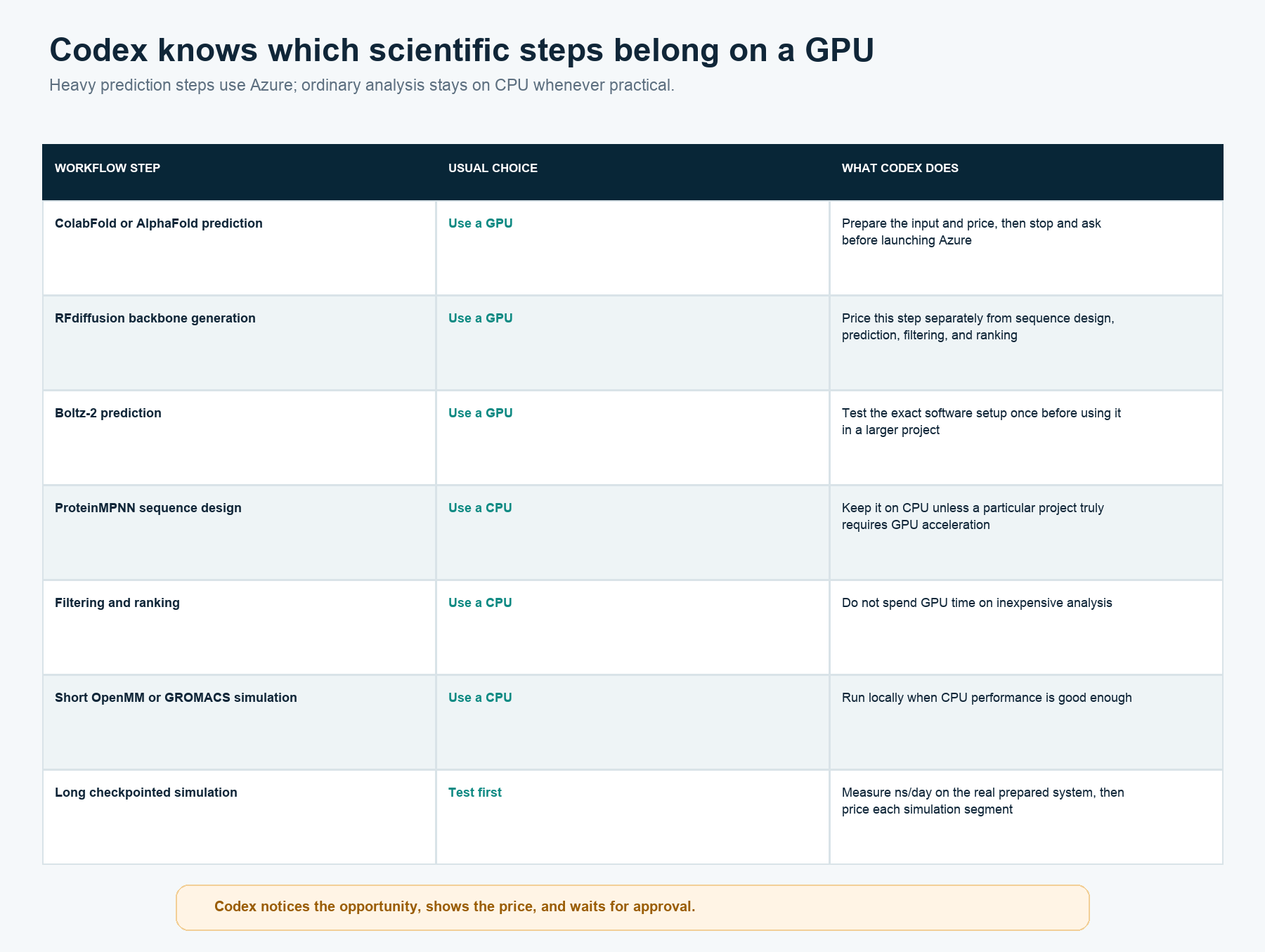
For a multi-step protein design workflow, Codex treats backbone generation, sequence design, structure prediction, filtering, and ranking as separate pieces. That avoids paying for a GPU during cheap CPU work. ProteinMPNN, filtering, ranking, and short molecular dynamics stay on CPU by default.
For a long simulation, Codex will not estimate performance from somebody else’s protein or solvent box. It first measures nanoseconds per day on the actual prepared system, then calculates the time and cost of each checkpointed segment.
The small set of commands
The user-facing interface is deliberately short:
gpu setup
gpu price
gpu estimate <job>
gpu benchmark <job>
gpu run <job>
gpu status
gpu stop <job>
gpu download <job>
gpu audit
gpu teardown
The most important command is gpu estimate. It reports where the job would run, the exact machine type, whether it is Standard or interruptible Spot capacity, the current hourly price, expected run time, expected cost, firm stop time, worst-case compute cost, small file-transfer allowance, and total approval ceiling.
Under the hood, Codex writes an Azure job description that fixes the machine count at one and includes the stopping time. It also creates a short fingerprint of the priced job, so an approval cannot silently apply to a different input, command, or price. Microsoft documents the job-file format here.
What made the setup straightforward
This was not a zero-click setup, and it should not be. The user still signed in, chose the subscription, approved creation of the Azure workspace, asked Azure for T4 capacity, approved one support permission, chose Standard pricing, and approved the $0.28 test.
It felt straightforward because Codex did the unfamiliar work between those decisions. It checked the computer, wrote the commands, diagnosed the disabled quota button, created the job description, found the price, monitored the run, downloaded the results, and checked that nothing remained running.
I supplied permissions and scientific intent, not cloud expertise.
The remaining limits are explicit:
Only the simple, single-sequence ColabFold test has completed end to end.
A ColabFold run with a multiple-sequence alignment still needs a decision about where the sequence may be sent and its own test.
RFdiffusion, Boltz-2, and other GPU programs still need their own fixed software setup and first benchmark.
Azure posts final billing records later; elapsed time gives an estimate, not the invoice.
Budget alerts remain warnings rather than hard stops.
Every future GPU submission still requires a live price and explicit authorization.
Disclaimer: The views in this analysis are mine alone. They are not endorsed by any organization or employer I am affiliated with, nor am I financially compensated in any way by any organization or employer to write these posts.